Turn a player’s development need into a shared plan every department uses.
The need can come from a coach, the data or the film. Plryer turns it into a target with a range, links the training to it, and ends each review with a decision.
Coach plan: 14-day free trial, then $4.99/month. Payment method required.
Ask five people what one player needs to improve.
Coaches, analysts, S&C and medical each see a different part of the problem. Plryer gets them to agree one focus, name an owner and review it together.
Ivo KellermanDevelopment staff · 6 people
Today 8:14 AM
Head coach
He keeps getting knocked off his screens. We need him holding them.
Performance analyst
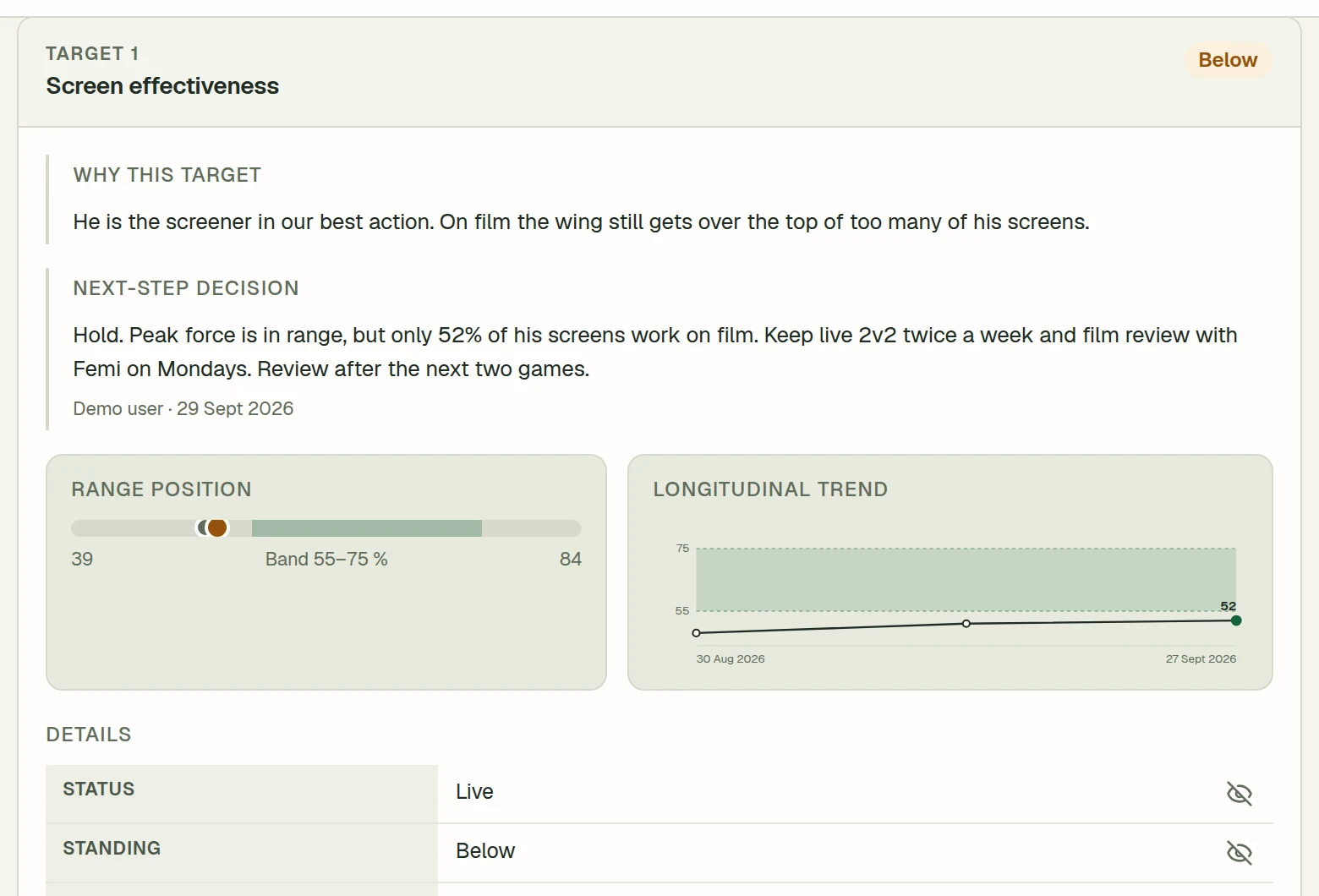
We score 0.84 points per possession when he screens. Team average is 1.02.
‼️
Video analyst
Clipped his last 17 screens. The defender got over the top on 8 of them.
S&C
Peak force is 2.2× bodyweight. Getting him to 2.5 would help him hold contact on screens.
👍
Medical
He’s fine to push. Just watch the load on that left ankle.
You
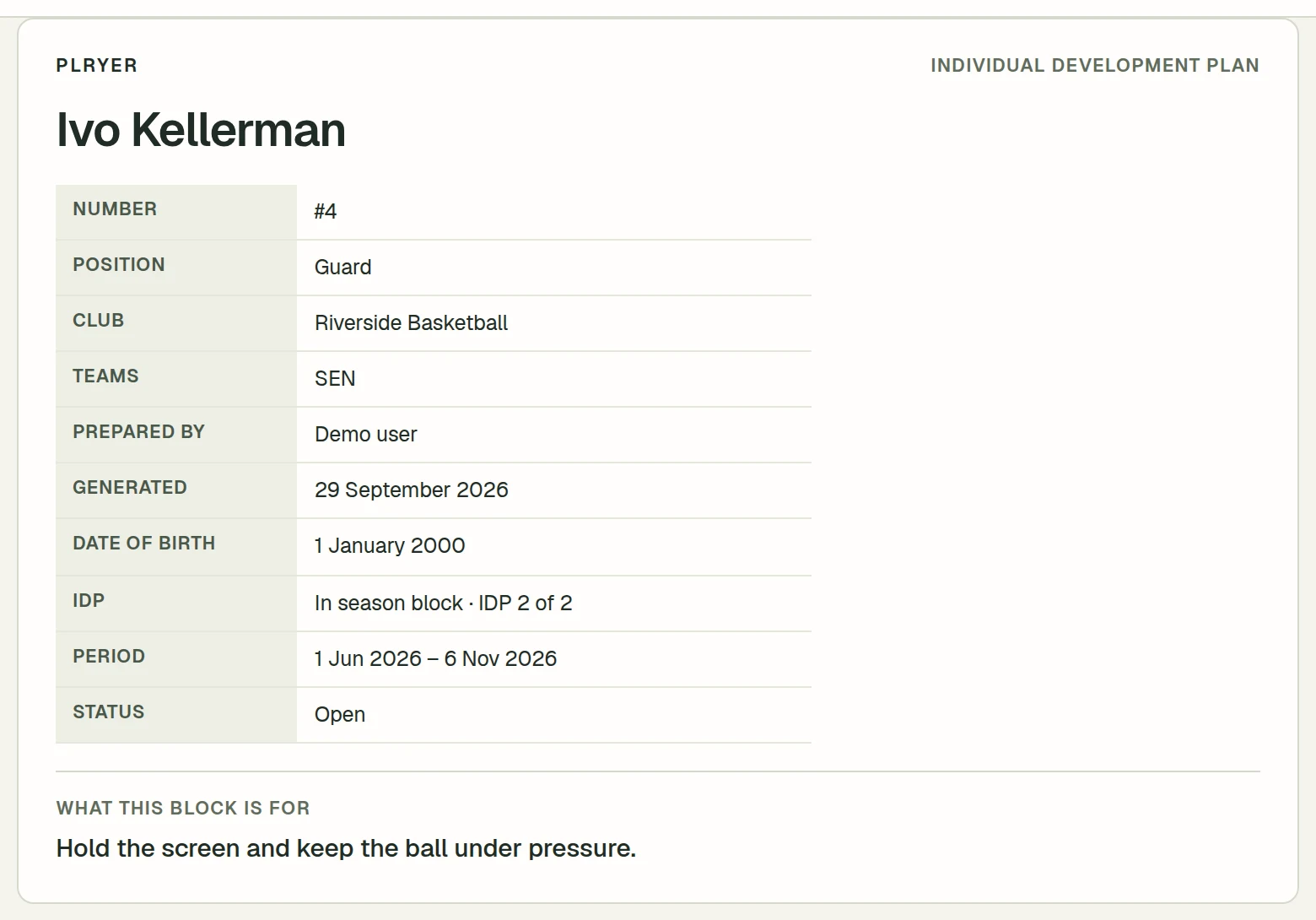
OK, let’s work on his screens. Plan’s below, we’ll review it on 6 Nov.
Role-based access: admins see every player, coaches see their teams
Shared game model, activity library and staff directory
∞ · For an organisation
Custom
For academies and multi-team organisations that need departments on the same targets.
Let’s talk
Priced to your roster, staff and contract
Coaches
Custom
Athletes
300+
Billing
Invoiced
Everything in Club, plus
Rosters beyond 300 athletes, with custom coach limits
Several clubs or academies under one account
Dedicated onboarding for your staff
Custom contract and invoicing
Prices in USD. Taxes are calculated at checkout by Paddle, our payment service. Subscriptions renew automatically. Cancel anytime from billing to stop the next renewal. Payments are non-refundable — see the Terms.
Before you sign up.
Anything else about your staff, your sport or your roster? Email support@plryer.dev and a person replies.
Can I use my own game model and measures?
Yes. You build the game model for your sport and create your own measures. A measure can be a number with a unit or a 1–5 rating scale with written anchors, and each player’s target has its own range.
Can different departments work on the same plan?
On Club and Custom, yes. Staff with access to a player log work, results and notes against the same targets. Departments organise staff; team assignments decide which players each person can see. Coach is a single-coach plan.
How does Plryer keep a plan short?
Two live targets by default. Plryer asks you to pause one before a third goes live. You can overrule it.
Plans run in blocks. A block has a start, an end and a one-line focus. A stopped target is paused with a reason.
A review rhythm per target. Weekly for film-rated work, six weeks by default for testing. Each target has an owner.
Every department, one target. Coach, S&C, analyst and medical log against the same target.
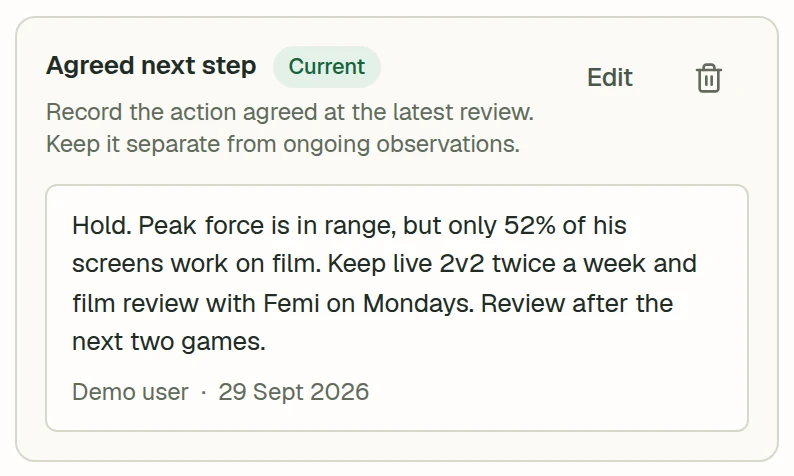
Reviews end in a decision. Progress, hold or change focus, written down with a date and an author.
Do athletes need an account?
No. Staff manage profiles, plans and results, and can print the plan for the player. Accounts are for adults aged 18 or older; junior athletes can be included in the club’s records.
What does the Coach plan cost?
$4.99 a month, or $49.99 a year (about 16% less). One coach, up to 3 athletes. It starts with a 14-day free trial; a payment method is required, and billing starts when the trial ends unless you cancel first.
What does Club cost?
Club is priced by roster size: from $9.99 a month for 25 athletes, with tiers at 50, 100, 150 and 300 athletes, and up to 100 coaches on any tier. Club has no free trial. Above 300 athletes, ask about Custom.
Can I cancel or get a refund?
You can cancel anytime from billing, which stops the next renewal. Payments are non-refundable, including unused time in the current period, except where the law requires otherwise. Prices are in USD; Paddle is our payment service and adds tax at checkout.
Who can access player information?
Within your organisation, admins can see all players and manage staff access. Other staff see players in their assigned teams. A department or job title does not grant access to every player, and player records are not public.
Can I use Plryer inside ChatGPT or Claude?
What it is. You can connect Plryer to ChatGPT or Claude and work with your players’ plans from the chat you already use. It is optional and off until you turn it on: you sign in to Plryer, see what the app is asking for and choose Allow.
What you can do. Talk a development plan through in as much detail as you like, by chat or, where your AI app offers it, by voice. Ask who is due a review, how a player is moving against a target, or what to focus on next, then have it draft the plan, add a result or put a note in a player’s log. Most of what you do in Plryer you can do from the chat, and whatever it records is saved under your name and marked as coming from ChatGPT or Claude.
Why it helps. Questions and notes come up right after a session, not when you are at a desk. You can deal with them in the chat, and they land in the same plan your staff use instead of a separate document you copy over later. Its answers start from the targets, results and notes already in Plryer.
Is it safe? The app works as you, with your access and no more. It only sees the players you can see, and a coach cannot do an admin’s job through it. It cannot invite or remove staff, change billing or your account, or delete a club. Quick records go straight in, but closing a block or deleting something needs your clear yes. You can disconnect it any time in your Account, then remove it in ChatGPT or Claude too.
Two things to know. What you ask for goes to the AI company (OpenAI or Anthropic) as part of your chat. They handle it under their own terms and disconnecting does not take it back, so check their settings and your club’s rules before using it with player information. And AI can get things wrong, so look over what it records.
Create one player and set the first target.
Start with the player your staff disagreed about in the last meeting.